
Engine Overview
NGINE-13 processes real-time game state into:
- EVO — Emotional Vectors
- CPO — Core Patterns (personality & archetype)
- GEO — Symbolic Geometry (world meaning)
- SIGIL — Intention Synthesis (action decision)
Everything in the documentation is organized around these four layers.
Installation
Unity Setup:
- Import the NGINE-13 Unity Package (.unitypackage)
- Add the Ngine13Core component to your central Game Manager
- Set your update frequency (default: 10ms)
- Register NPCs with the RegisterAgent() function
- Connect world events to the event dispatcher
- Ngine13Core.RegisterAgent(npcID, npcReference)
Unreal Setup:
- Add the NGINE-13 Plugin to your Plugins folder
- Enable “Ngine13Module” in Project Settings
- Create an ANgineAgent subclass for each NPC type
- Bind event broadcasts inside blueprints or C++
- UNgine13Module::Get().RegisterAgent(this)
Custom Engine (C++/C#):

Initialize Engine:

Register agents:

Core Concepts of NGINE-13
EVO — Emotional Vector Object
EVO updates continuously based on world stimuli.
Schema:
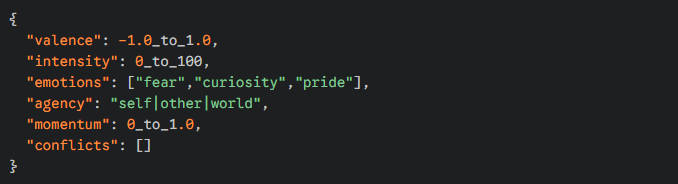
Update Function (Pseudo-Code):
- EVO.ApplyStimulus(stimulusType, magnitude, source);
- CPO — Core Pattern Object
- Defines personality, identity, traits.
Schema:
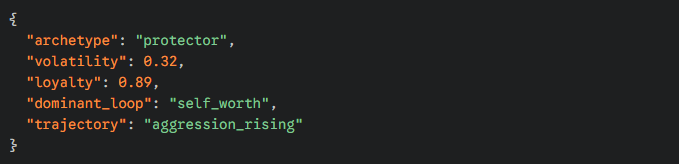
Update Function:
- CPO.Evolve(EVO, worldState);
- GEO — Symbolic Geometry
- Used to convert world objects into symbolic meaning.
Schema:
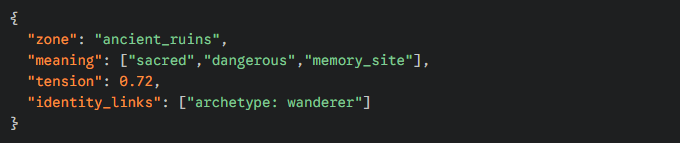
Mapping Example:
- GEO.AssignMeaning(zoneID, Symbols.Sacred | Symbols.Hostile);
- SIGIL — Intention Synthesis
- Final layer determining chosen action.
Schema:
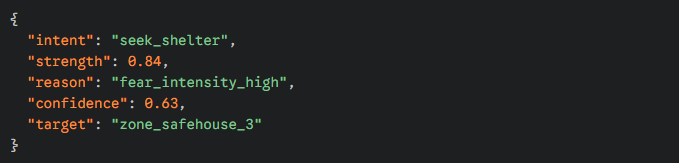
Function:

World Event Integration
NGINE-13 responds to stimulus events.
You can broadcast events such as:
- DamageTaken
- WitnessedDeath
- ItemAcquired
- BetrayedBy
- AssistedAlly
- EnteredSymbolicZone
- CompletedRitual
- SocialRejection
- VictoryAchieved
Example — Broadcasting a Damage Event:

Multi-Input Stimulus:

NPC Lifecycle
Register Agent

Feed Stimuli

Update Per Tick

Query Behavior

Symbolic Geometry Tools
NGINE-13 includes a Symbolic Map Editor (Unity & Unreal).
You can assign meanings to:
- Regions
- Landmarks
- Structures
- Items
- Factions
- Characters
- Events
Code Example:

Tagging via Editor:
- Select object
- Add “Ngine13Symbolic” component
- Check meaning boxes
Working With SIGIL Outputs
SIGIL is not animation or movement.
SIGIL is a decision object your systems interpret.
Example:

SIGIL can influence:
- Movement
- Dialogue
- Animations
- Quests
- Faction behavior
- Trading logic
- Combat states
- Diplomacy states
You always keep full control.
Performance & Optimization
NGINE-13 is built for real-time.
Key Guidelines:
- Process heavy emotional updates in 5–20ms intervals
- Batch symbolic checks
- Cache world meanings
- Avoid sending every tiny event—send significant stimuli
Use NPC LOD levels (high detail only for active characters)
Recommended NPC Limits:
| NPC | Type | Quantity | Notes |
|---|---|---|---|
| High-emotion | Agents | 200–500 | Full EVO/CPO Calculation |
| Mid-tier | Agents | 1,000–5,000 | Partial symbolic Updates |
| Background | Agents | Unlimited | Periodic CPO Updates |
Debugging & Visualization
Included debugging tools:
- Emotional HUD Overlay
- Symbolic Heatmap Viewer
- Archetype Visualizer
- SIGIL Timeline Inspector
- NPC Emotional History Graph
Use:

Best Practices for Integration
Do:
- Use symbolic meaning rather than coordinates
- Send emotionally significant events
- Build archetypes based on story themes
- Use debug visualizers to tune behavior
- Keep emotion ranges bounded
Don’t:
- Spam minor events
- Overload NPCs with high-intensity stimuli
- Use SIGIL for deterministic script moments
- Try to use NGINE-13 to replace all scripted content
Versioning
NGINE-13 SDK v0.9 (Alpha)
Unity 2020+
Unreal Engine 5.1+
.NET 4.8+ / .NET Standard
C++17+
API Reference
Links to full API:
- EVO Class Reference
- CPO Class Reference
- GEO Mapping Reference
- SIGIL Output Reference
- Event Dispatch System
- Integration Examples
- Performance Utilities
Support:
- Discord Developer Channel
- Email Support
- Video Tutorials
- Sample Projects